
Services / For small businesses
Set up right.
Ready to grow.
Start with what your business needs now: professional email, a move to Microsoft 365, or a website. Add shared files, reporting, and automation when you are ready.
01 / Business email
Email that looks
like a business.
Move off a free Gmail or Hotmail address onto email at your own domain, like you@yourbusiness.ca. I set it up on Microsoft 365 or Google Workspace, add the domain records that keep your messages out of spam folders, and get it working on every computer and phone.
- Mailboxes for each person, plus shared inboxes like info@
- Domain records: MX, SPF, DKIM, and DMARC
- Outlook on computers and phones, with signatures
- Two-step sign-in so accounts stay secure
Need a domain first? I can help you register one in your business’s name. Microsoft or Google subscription fees are billed to you directly. Registered charities and nonprofits may qualify for Microsoft’s nonprofit offers, and I can help you check before choosing a plan.
What a small office usually needs
Personal mailboxes
One per person, on your own domain.
sarah@ / james@ / owner@Shared inbox
One address the whole team can see and answer.
info@ or bookings@Domain records
Proof to other mail servers that your email is genuine.
Checked before and after02 / Move to Microsoft 365
Move across.
Keep everything.
Bring your email, calendars, contacts, and files into Outlook, OneDrive, SharePoint, and Teams. The move is planned around your business: accounts are counted first, the switch-over happens at a quiet time, and the old service stays open until everything is checked.
- Inventory of accounts, mailboxes, and shared files
- Email, calendars, and contacts copied across
- Files moved into OneDrive, SharePoint, or Teams
- Before-and-after checks, then staff training
Moves need admin access to the old and new accounts, which we arrange securely, never through the enquiry form. Large mailboxes or file shares may need more time.
Common starting points
Gmail or Google Workspace
Email, calendars, and Drive files.
To Outlook, OneDrive, and SharePointOld hosting email
Mailboxes from a web host or internet provider.
To Exchange Online mailboxesFiles on a PC or USB
Documents scattered across devices and drives.
To shared, backed-up SharePoint folders03 / Security check-up
Close the doors
you did not know were open.
Many small business account problems start with a stolen password, an old account nobody closed, or a file shared with the whole internet. A check-up goes through your Microsoft 365 setup, explains what it finds in plain language, and fixes what you approve.
- Two-step sign-in turned on for everyone
- Admin access limited to the people who need it
- Old accounts and unused licences cleaned up
- Sharing settings and a backup plan for mail and files
A good fit right after a move to Microsoft 365, or once a year. It is a review plus the fixes you approve, not a guarantee against every attack.
What gets checked
Sign-in
Two-step sign-in on every account, and admin accounts kept separate.
One of the strongest protectionsAccounts & licences
Former staff removed and unused licences cancelled.
Pay only for what you useSharing & backup
Outside sharing limited, and a backup plan for mail and files.
Agreed with the owner04 / Websites
Easy to find.
Easy to contact.
A clear, fast website on your own domain that explains what you do and makes it easy to get in touch. I handle the design, domain, hosting, and contact form, and connect it to your email and to Google and Bing.
- Design and pages built around your customers
- Domain, hosting, and secure HTTPS
- A contact form that reaches your inbox
- Google Business Profile, Bing Places, and search setup
Built with WordPress, Squarespace, Wix, or custom code, whichever suits how often you plan to update it. You get the logins and a short guide to making changes.

Saint Philip Neri Parish, North York. A WordPress site for three language communities, with Mass times and livestreams.
05 / Teams & SharePoint
Put shared work
in the right place.
Once everyone is on Microsoft 365, set up Teams, SharePoint, and shared folders around your real roles, so people can find files and only the right people can open them.
- Current-file and workspace map
- Named owners and agreed permissions
- Pilot setup and staff access checks
- Practical training and handover guide
The workspace layouts shown here are planning samples. Guest access, retention, and live permissions are agreed and tested with your administrator.
Fictional workspace plan
Company hub
Policies, approved templates, and onboarding.
All staff read / Named workspace ownersClient delivery
Project documents, handoffs, and consistent folders.
Assigned staff edit / Access checked in a pilotSales workspace
Proposals and internal pipeline documents.
Sales team only / Permissions agreed with the owner06 / Reporting & spreadsheets
Get to the question
behind the numbers.
Power BI reports and cleaner Excel for sales, operations, collections, or monthly performance. Agree on the definitions, check totals against your source, and make the detail easy to explore.
- Source review and metric definitions
- Excel cleanup with an exception trail
- Report pages, filters, and detail views
- Editable files and a refresh walkthrough
Publishing, viewer access, and scheduled refresh are separately scoped and tested in your environment.
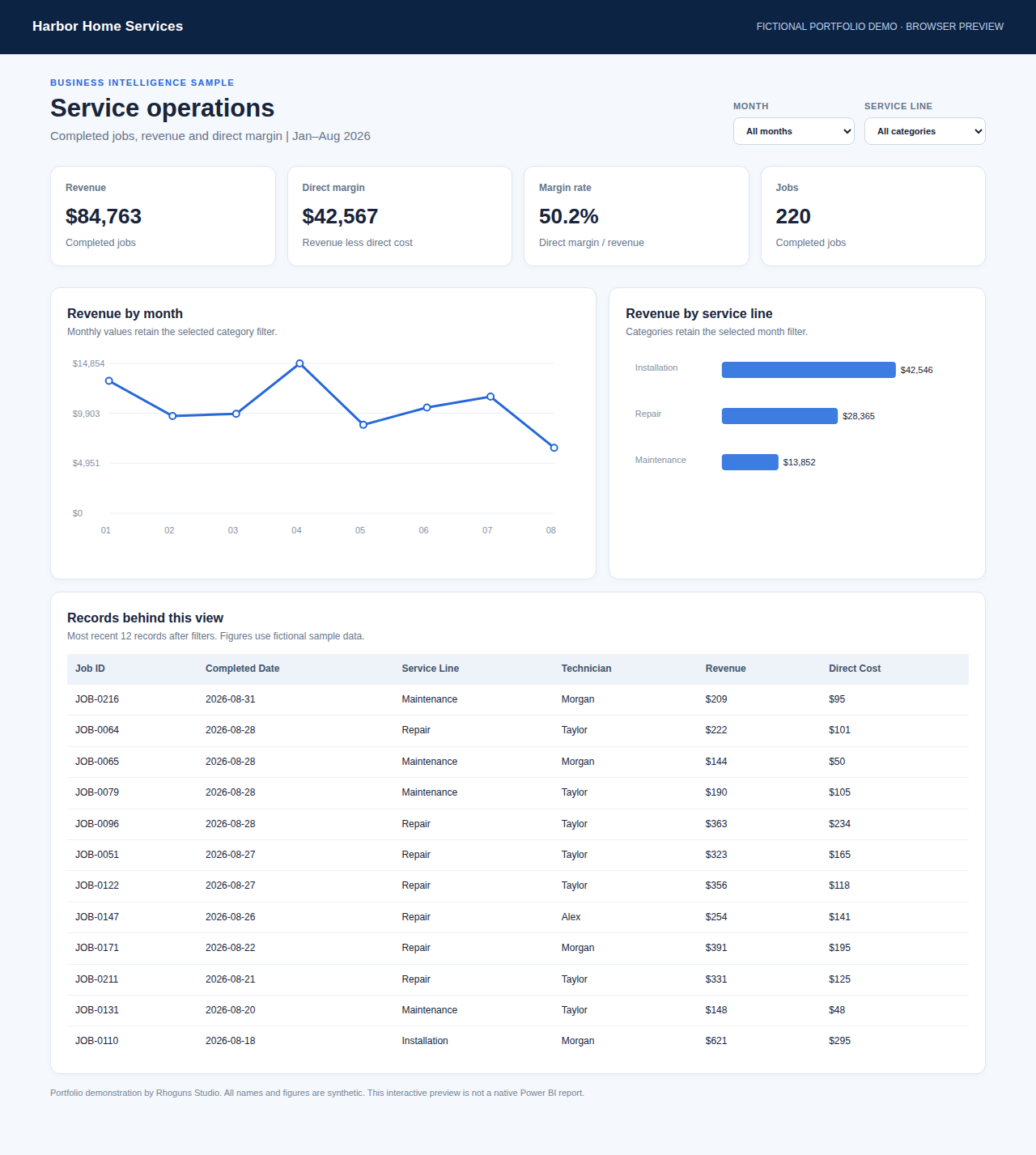
The sample has a native Power BI Desktop report. This image shows its interactive browser preview, not Power BI Service.
07 / Automation
Let the routine steps
run themselves.
Use Power Automate for one repeatable process at a time: a form that files itself, an approval that reaches the right person, or a reminder that goes out on schedule.
Requests & approvals
Intake, assigned ownership, status, approval, and a record of each handoff.
Reminders & routing
Lead routing or invoice reminders, with duplicate handling and agreed notifications.
Website to inbox
Website enquiries saved to a list and sent to the right person, so nothing is missed.
Automation examples are prepared plans. Connectors, licensing, and acceptance tests are confirmed in a small pilot before wider use.
08 / Training & ongoing help
Technology your team
can actually use.
Training uses your own accounts and real tasks, with written instructions. Your business keeps its accounts and data.
Owner handover
Admin logins in your business’s name, written steps, and a walkthrough for staff.
Ongoing help
New staff accounts, website updates, and small changes when you need them.
Defined support
Agree on what is included, a response window, and what counts as a new project.
Tell me what is not working.
We will find the first step.
Start with the tools you already use and the problem you most want solved.